> ## Documentation Index
> Fetch the complete documentation index at: https://docs.tradionlabs.com/llms.txt
> Use this file to discover all available pages before exploring further.
# A tour of Tradion
> Every screen in the sidebar, top to bottom, and what each is for.
Tradion is one page with a fixed sidebar. The sidebar never changes, the main area swaps out, and everything below is in the order you'll meet it.
 ## Home
The screen you land on every time you sign in. A launchpad, not a dashboard: nothing here is analysis to act on; everything is a way back into work you started.
## Home
The screen you land on every time you sign in. A launchpad, not a dashboard: nothing here is analysis to act on; everything is a way back into work you started.
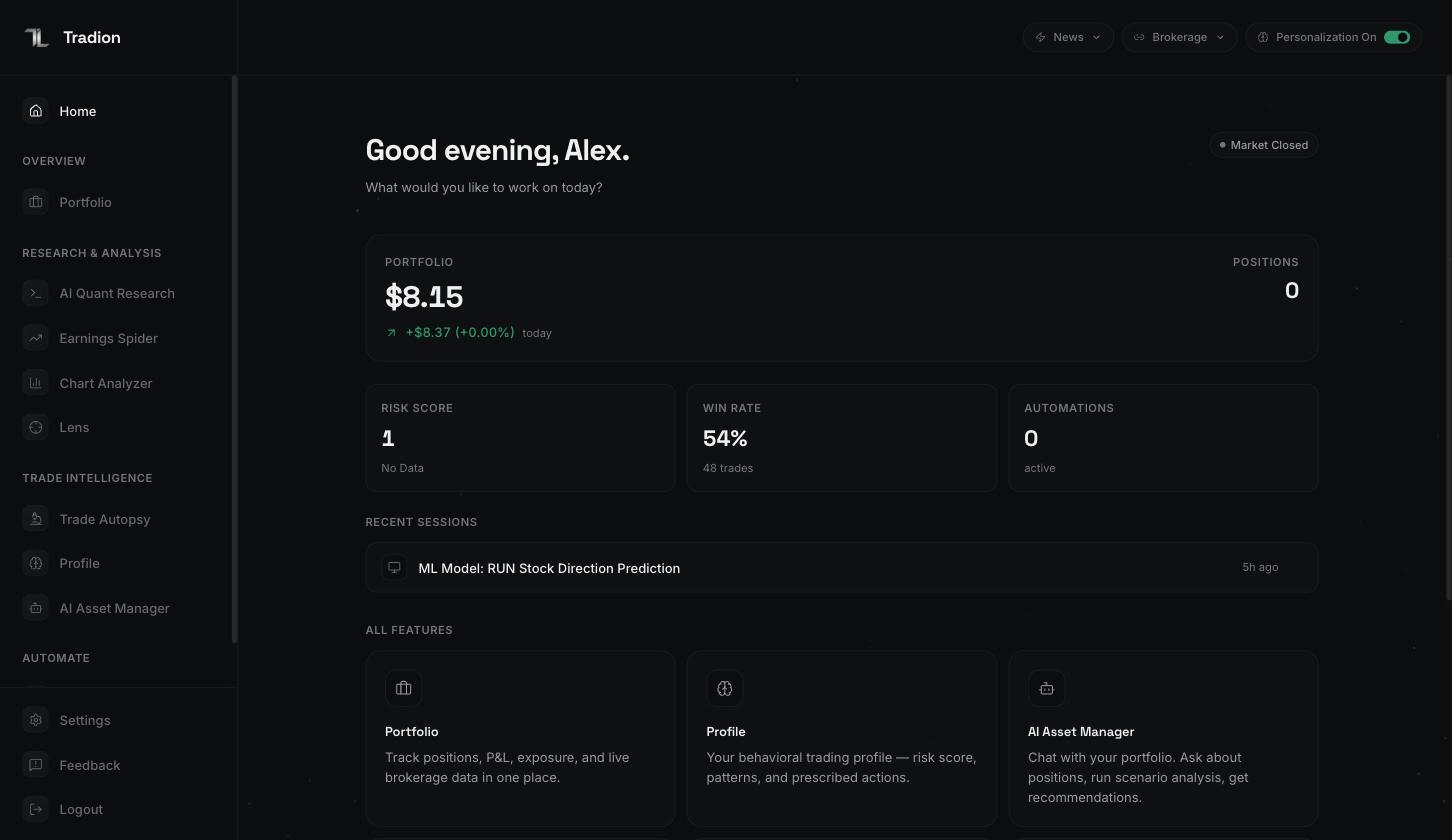 Four bands, top to bottom:
**The header.** Your first name, and a pill showing whether the US market is open, in pre-market, after-hours, or closed. Connect a brokerage and you also get a snapshot — total value and today's change. Without one, that tile prompts you to add it.
**Your numbers.** Three tiles pulled from elsewhere in the product:
| Tile | What it is | Where it comes from |
| ------------------ | ------------------------------------------------------------- | -------------------------------------- |
| Risk score | A 0–100 read on how much risk your recent trading has carried | [Profile](/trade-intelligence/profile) |
| Win rate | The share of your logged trades that closed in profit | Your trade log |
| Active automations | How many rules are running right now | [Automations](/automations/overview) |
They stay empty until you have logged trades or built automations — expected on day one, not a fault.
**Recent sessions.** Quant research and AI Asset Manager conversations, newest first. Clicking one reopens it with its charts and answers intact, so last week's question is a starting point, not a retype.
**The launcher.** A card for every other screen, each with a one-line description — no need to remember which group a tool sits in.
→ [The Tradion Loop](/concepts/the-loop)
## Overview
### Portfolio
Everything you hold: an equity curve (a line chart of the account's value over time) with 1W to All-time ranges, day and total profit and loss, sector allocation with a diversification score, a sortable holdings table with 10-session mini charts, and your biggest movers. It fills in once you connect a brokerage — a read-only link, so Tradion sees positions but places no orders.
→ [Portfolio overview](/portfolio/overview) · [Connecting a brokerage](/portfolio/connect-brokerage)
## Research & Analysis
### AI Quant Research
A split screen: chat on the left, a canvas of results on the right. Ask a question in plain English — comparing two stocks' volatility (how much a price swings around, measured from its own history), screening for a setup, testing an idea against past prices — and Tradion writes and runs the Python, returning charts, tables, and a summary. You never see code unless you want to.
The quant terminal needs the **Trader** plan or above.
→ [AI Quant Research](/research/quant-research) · [Your first analysis](/research/your-first-analysis)
### Earnings Spider
Upload an earnings report or transcript as a PDF and get it read for you: earnings per share and revenue against what analysts expected, next-quarter guidance, a bullish/bearish/neutral signal, and a tone analysis that flags when the CEO and CFO say different things. It also keeps a calendar of upcoming reports.
→ [Earnings Spider](/research/earnings-spider)
### Chart Analyzer
Drop in a saved chart image and get a BUY, SELL, WAIT, or NO TRADE verdict with a 0–100 confidence score, an entry price, a stop-loss (where you'd exit if it goes against you), a target, and the risk/reward ratio. The score breaks into the factors behind it, so you can see what the call rests on.
→ [Chart Analyzer](/research/chart-analyzer) · [Reading a verdict](/concepts/reading-a-verdict)
### Lens
Lens does the same job without the file. It opens a full-screen live chart inside Tradion — set the symbol, timeframe, and indicators, then click **Capture**. Back comes a verdict, a summary, bull/base/bear price targets, and support and resistance levels (prices where buying or selling has tended to show up before). Follow-up questions are allowed.
Lens reads its own chart, not your other tabs. For an image you already have, use Chart Analyzer.
→ [Lens](/research/lens)
## Trade Intelligence
### Trade Autopsy
Where a closed trade gets taken apart. Log it — typed out in plain English, or imported from your broker — then run an autopsy. You get a root-cause breakdown, a 0–100 scorecard across entry quality, exit discipline, and risk management, and a counterfactual: the same trade replayed with one thing changed. Repeat findings become named patterns, and patterns become playbook rules that check you before the next trade.
→ [Trade Autopsy](/trade-intelligence/trade-autopsy) · [Logging a trade](/trade-intelligence/logging-a-trade)
### Profile
Your trading health check, assembled from everything else: a risk score, recurring mistakes ranked by severity and frequency, win rate by time of day, a year-long calendar of wins and losses, your goals, and your playbook rules. After two autopsies it unlocks a psychological profile — trader archetype, cognitive biases (predictable thinking errors, like holding losers longer than winners) with evidence from your own trades, and how you behave under stress.
→ [Profile](/trade-intelligence/profile)
### AI Asset Manager
A chat window that can see your real positions. Because it reads live holdings rather than guessing, you can ask concrete things — how concentrated you are in one sector, what a 20% fall in one name would do to the portfolio — and the numbers reconcile with your broker. Sessions are saved; answers come with charts.
→ [AI Asset Manager](/portfolio/ai-asset-manager)
## Automate
### Automations
A drag-and-drop canvas where you build a rule: pick an asset, add conditions, join them with AND/OR, optionally hand the result to an AI research agent, then choose where the message goes. Conditions can be price levels, one of 92 technical readings — 61 indicators plus 31 candlestick patterns, volume spikes, daily percentage moves, news, earnings proximity, unusual options activity, insider filings, or corporate actions. Every rule is checked once a minute, around the clock — not only during market hours — and alerts reach you through Discord, email, Telegram, in-app, or your own webhook.
Automations need the **Trader** plan or above.
→ [Automations overview](/automations/overview) · [Your first automation](/automations/first-automation) · [Operators](/automations/operators)
## Settings
Pinned at the bottom of the sidebar: display name, subscription and billing, connected brokerages, theme, account deletion. During a free trial a countdown badge appears above it. Under it sit **Feedback**, which attaches a note to the screen you were on, and **Logout**.
→ [Settings](/account/settings) · [Managing your subscription](/account/managing-subscription)
## The status bar
Three controls follow you everywhere except AI Quant Research, which runs edge to edge:
* **The news wire** — a live headline ticker you can open for the full feed.
* **Brokerage** — each connected broker, its accounts, when it last synced, and a sync button.
* **Personalization** — whether Tradion Memory feeds your history into AI answers. Off means generic analysis. It applies everywhere, immediately.
→ [Tradion Memory](/concepts/tradion-memory)
Signup to first analysis in about ten minutes.
Why these screens are four stations on one circle.
Four bands, top to bottom:
**The header.** Your first name, and a pill showing whether the US market is open, in pre-market, after-hours, or closed. Connect a brokerage and you also get a snapshot — total value and today's change. Without one, that tile prompts you to add it.
**Your numbers.** Three tiles pulled from elsewhere in the product:
| Tile | What it is | Where it comes from |
| ------------------ | ------------------------------------------------------------- | -------------------------------------- |
| Risk score | A 0–100 read on how much risk your recent trading has carried | [Profile](/trade-intelligence/profile) |
| Win rate | The share of your logged trades that closed in profit | Your trade log |
| Active automations | How many rules are running right now | [Automations](/automations/overview) |
They stay empty until you have logged trades or built automations — expected on day one, not a fault.
**Recent sessions.** Quant research and AI Asset Manager conversations, newest first. Clicking one reopens it with its charts and answers intact, so last week's question is a starting point, not a retype.
**The launcher.** A card for every other screen, each with a one-line description — no need to remember which group a tool sits in.
→ [The Tradion Loop](/concepts/the-loop)
## Overview
### Portfolio
Everything you hold: an equity curve (a line chart of the account's value over time) with 1W to All-time ranges, day and total profit and loss, sector allocation with a diversification score, a sortable holdings table with 10-session mini charts, and your biggest movers. It fills in once you connect a brokerage — a read-only link, so Tradion sees positions but places no orders.
→ [Portfolio overview](/portfolio/overview) · [Connecting a brokerage](/portfolio/connect-brokerage)
## Research & Analysis
### AI Quant Research
A split screen: chat on the left, a canvas of results on the right. Ask a question in plain English — comparing two stocks' volatility (how much a price swings around, measured from its own history), screening for a setup, testing an idea against past prices — and Tradion writes and runs the Python, returning charts, tables, and a summary. You never see code unless you want to.
The quant terminal needs the **Trader** plan or above.
→ [AI Quant Research](/research/quant-research) · [Your first analysis](/research/your-first-analysis)
### Earnings Spider
Upload an earnings report or transcript as a PDF and get it read for you: earnings per share and revenue against what analysts expected, next-quarter guidance, a bullish/bearish/neutral signal, and a tone analysis that flags when the CEO and CFO say different things. It also keeps a calendar of upcoming reports.
→ [Earnings Spider](/research/earnings-spider)
### Chart Analyzer
Drop in a saved chart image and get a BUY, SELL, WAIT, or NO TRADE verdict with a 0–100 confidence score, an entry price, a stop-loss (where you'd exit if it goes against you), a target, and the risk/reward ratio. The score breaks into the factors behind it, so you can see what the call rests on.
→ [Chart Analyzer](/research/chart-analyzer) · [Reading a verdict](/concepts/reading-a-verdict)
### Lens
Lens does the same job without the file. It opens a full-screen live chart inside Tradion — set the symbol, timeframe, and indicators, then click **Capture**. Back comes a verdict, a summary, bull/base/bear price targets, and support and resistance levels (prices where buying or selling has tended to show up before). Follow-up questions are allowed.
Lens reads its own chart, not your other tabs. For an image you already have, use Chart Analyzer.
→ [Lens](/research/lens)
## Trade Intelligence
### Trade Autopsy
Where a closed trade gets taken apart. Log it — typed out in plain English, or imported from your broker — then run an autopsy. You get a root-cause breakdown, a 0–100 scorecard across entry quality, exit discipline, and risk management, and a counterfactual: the same trade replayed with one thing changed. Repeat findings become named patterns, and patterns become playbook rules that check you before the next trade.
→ [Trade Autopsy](/trade-intelligence/trade-autopsy) · [Logging a trade](/trade-intelligence/logging-a-trade)
### Profile
Your trading health check, assembled from everything else: a risk score, recurring mistakes ranked by severity and frequency, win rate by time of day, a year-long calendar of wins and losses, your goals, and your playbook rules. After two autopsies it unlocks a psychological profile — trader archetype, cognitive biases (predictable thinking errors, like holding losers longer than winners) with evidence from your own trades, and how you behave under stress.
→ [Profile](/trade-intelligence/profile)
### AI Asset Manager
A chat window that can see your real positions. Because it reads live holdings rather than guessing, you can ask concrete things — how concentrated you are in one sector, what a 20% fall in one name would do to the portfolio — and the numbers reconcile with your broker. Sessions are saved; answers come with charts.
→ [AI Asset Manager](/portfolio/ai-asset-manager)
## Automate
### Automations
A drag-and-drop canvas where you build a rule: pick an asset, add conditions, join them with AND/OR, optionally hand the result to an AI research agent, then choose where the message goes. Conditions can be price levels, one of 92 technical readings — 61 indicators plus 31 candlestick patterns, volume spikes, daily percentage moves, news, earnings proximity, unusual options activity, insider filings, or corporate actions. Every rule is checked once a minute, around the clock — not only during market hours — and alerts reach you through Discord, email, Telegram, in-app, or your own webhook.
Automations need the **Trader** plan or above.
→ [Automations overview](/automations/overview) · [Your first automation](/automations/first-automation) · [Operators](/automations/operators)
## Settings
Pinned at the bottom of the sidebar: display name, subscription and billing, connected brokerages, theme, account deletion. During a free trial a countdown badge appears above it. Under it sit **Feedback**, which attaches a note to the screen you were on, and **Logout**.
→ [Settings](/account/settings) · [Managing your subscription](/account/managing-subscription)
## The status bar
Three controls follow you everywhere except AI Quant Research, which runs edge to edge:
* **The news wire** — a live headline ticker you can open for the full feed.
* **Brokerage** — each connected broker, its accounts, when it last synced, and a sync button.
* **Personalization** — whether Tradion Memory feeds your history into AI answers. Off means generic analysis. It applies everywhere, immediately.
→ [Tradion Memory](/concepts/tradion-memory)
Signup to first analysis in about ten minutes.
Why these screens are four stations on one circle.