> ## Documentation Index
> Fetch the complete documentation index at: https://docs.tradionlabs.com/llms.txt
> Use this file to discover all available pages before exploring further.
# The research notebook
> Save a thesis or a forecast before results arrive, then check it against what the company actually reported.
The notebook is where Earnings Deep Research keeps what you believe next to the evidence, so you can test your view against reported results instead of remembering it kindly.
Part of [Earnings Deep Research](/research/ai-earnings-research), included on both plans. Saving to the notebook does not use a message. Only questions do.
Open it with **Notebook** in the top bar. It has five tabs.
| Tab | What it holds |
| --------------- | ------------------------------------------------------------------------- |
| **Theses** | A view you wrote, what would prove it wrong, and the evidence behind it |
| **Forecasts** | Revenue and profit scenarios you saved from the **Scenarios** view |
| **Transcripts** | Earnings-call passages saved during research |
| **Estimates** | Snapshots of analyst estimates, with when each was captured |
| **Prices** | Market prices saved during research, kept apart from earnings conclusions |
Transcripts, Estimates and Prices fill in by themselves as your questions fetch them. You write Theses and Forecasts.
## Write a thesis
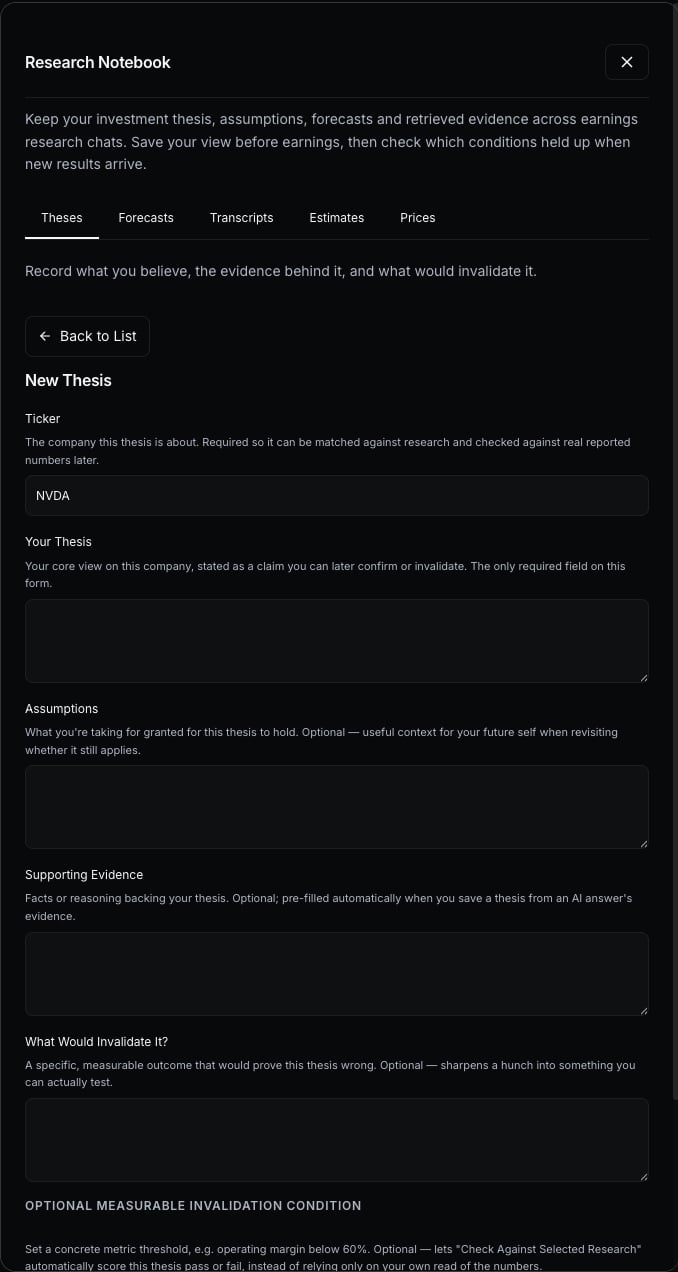
A **thesis** is a claim about a company you can later confirm or drop, such as "this company's margins will keep widening".
Under any answer, **Save as Thesis** opens the form with the answer's evidence filled in. Or choose **New Thesis** in the notebook.
**Your Thesis** is the only required field. **Assumptions**, **Supporting Evidence** and **What Would Invalidate It?** are optional, and the last one is worth filling in. A view with no condition that would end it cannot be tested.
Choose a measure (operating margin, cash conversion, stock compensation as a share of revenue, revenue or free cash flow), **Above** or **Below**, and a number. This is the line that, if crossed, invalidates your thesis.
 ## Check it when results arrive
Open the record and choose **Check Against Selected Research**. Tradion compares your condition with the latest reported quarter in the research you have open and saves the result with the date.
| Result | Meaning |
| ------------------------------ | --------------------------------------- |
| **Invalidation Condition Met** | The reported figure crossed your line |
| **Condition Not Met** | It did not |
| **Unknown** | The company did not report that measure |
Only a condition with a number is checked automatically. Your written assumptions are not. They need you to read the evidence and decide.
## Forecasts
In **Scenarios**, enter a revenue growth, a net margin and the quarter you are aiming at, then **Save Forecast** with your assumptions. It is your scenario, not a prediction. Tradion assigns it no probability.
When that quarter is reported, a check compares your predicted revenue and net income with the actual figures. Two outcomes stop it from being scored:
* **Awaiting Results.** No matching quarter has been reported yet. A quarter counts as a match when it ends within 10 days of your target.
* **Retrospective; Excluded.** You saved the forecast on or after the quarter ended, so it is left out. A forecast only means something if you saved it before the results were known.
Actual figures use the latest filed values, including any restatement, so a score can shift slightly if a company revises a past quarter.
### In plain English
A forecast made after the answer is known is not a forecast. The notebook refuses to score those, so your record holds only views you took before the answer was known.
## Editing and deleting
Edit a thesis from its record. If you changed it in another tab, Tradion asks you to reload before saving, so one tab cannot overwrite the other. **Delete** asks for a second click to confirm.
Asking questions and reading the four views.
The sources behind every saved estimate and transcript.
## Check it when results arrive
Open the record and choose **Check Against Selected Research**. Tradion compares your condition with the latest reported quarter in the research you have open and saves the result with the date.
| Result | Meaning |
| ------------------------------ | --------------------------------------- |
| **Invalidation Condition Met** | The reported figure crossed your line |
| **Condition Not Met** | It did not |
| **Unknown** | The company did not report that measure |
Only a condition with a number is checked automatically. Your written assumptions are not. They need you to read the evidence and decide.
## Forecasts
In **Scenarios**, enter a revenue growth, a net margin and the quarter you are aiming at, then **Save Forecast** with your assumptions. It is your scenario, not a prediction. Tradion assigns it no probability.
When that quarter is reported, a check compares your predicted revenue and net income with the actual figures. Two outcomes stop it from being scored:
* **Awaiting Results.** No matching quarter has been reported yet. A quarter counts as a match when it ends within 10 days of your target.
* **Retrospective; Excluded.** You saved the forecast on or after the quarter ended, so it is left out. A forecast only means something if you saved it before the results were known.
Actual figures use the latest filed values, including any restatement, so a score can shift slightly if a company revises a past quarter.
### In plain English
A forecast made after the answer is known is not a forecast. The notebook refuses to score those, so your record holds only views you took before the answer was known.
## Editing and deleting
Edit a thesis from its record. If you changed it in another tab, Tradion asks you to reload before saving, so one tab cannot overwrite the other. **Delete** asks for a second click to confirm.
Asking questions and reading the four views.
The sources behind every saved estimate and transcript.