
Automations need the Trader plan or above. Starter accounts cannot create one. See plans.

Read it left to right. Only the first and last nodes are compulsory.
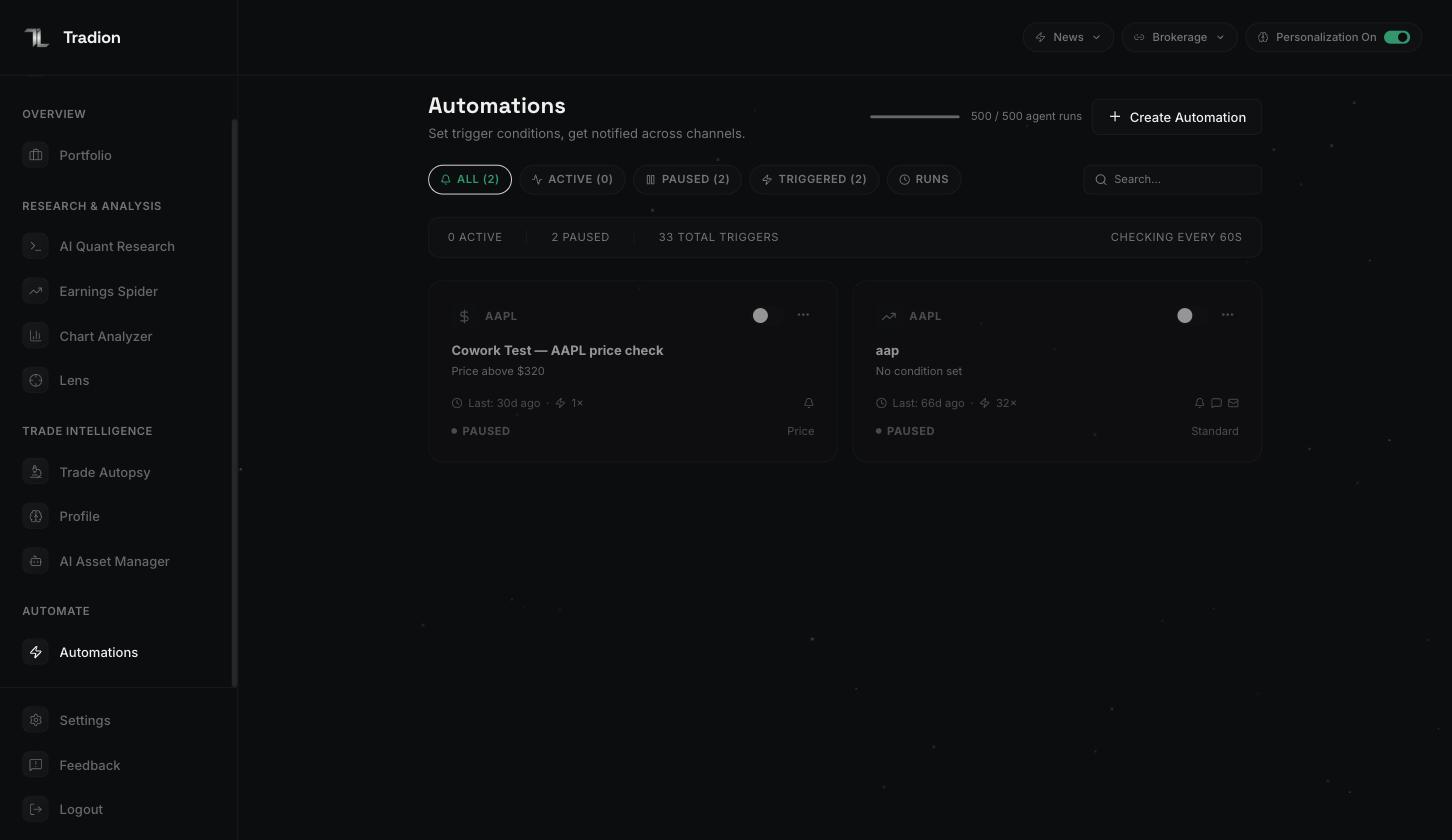
The automations list. Filter tabs across the top, one card per automation, and your agent-run balance beside the create button.
What an automation is not
An automation alerts you. It does not trade for you. Tradion cannot place, change, or cancel an order. There is no order node on the canvas, and connected brokerage accounts are read-only. When a research agent writes something that reads like a trade plan, that is generated text inside a message — nothing has been sent to a broker. Every click that costs money stays with you.The five node types
There is also an optional Schedule node. On its own it fires the automation on a clock — weekdays at 9:25 AM, say — with no market condition involved. Alongside signals it works as a time gate: signals are only checked inside the scheduled window.
Every automation needs an Asset and an Action, plus either at least one Signal or a Schedule. Save without one of those and the canvas refuses with
At least one signal or schedule is required.
Two ways to start
Click New automation and you get a choice screen.- Use a template
- Start from scratch
45 pre-built automations in seven categories: Price Action, Technical, Event-Driven, Crypto, Risk Management, Multi-Agent Strategies, and Scheduled Briefs. Each row shows its conditions, its agents, its channel count, and a Beginner / Intermediate / Advanced label. Picking one drops a fully wired canvas in front of you — change the ticker first.
Active, paused, and triggered
An automation is either Active or Paused. There is no third state. The toggle sits on the automation’s card. The list also has a Triggered filter tab, which is not a state — it narrows the list to automations that have fired at least once. The Runs tab beside it shows every execution across all your automations, and that is where you go when something needs debugging. See runs and history. Active automations are re-checked every 60 seconds. If every signal on an automation is a price or volume check on a US stock, Tradion also watches the live trade feed between 9:30 AM and 4:00 PM ET and reacts within about a second. Everything else runs on the 60-second cycle.Checks do not stop when the market closes. Outside trading hours Tradion evaluates against the last known price, so an overnight news or corporate-action signal still fires. Crypto runs continuously.
In plain English
Nothing about an automation is scheduled around your day. Once a minute, for every Active automation you own, Tradion asks whether all its conditions are true at that instant. If they are and no cooldown is running, the message goes out. Nobody watches the gaps between checks, so a condition that flickers true for ten seconds may never be seen — and a condition that stays true all week fires once, then waits out the cooldown, then fires again.Cooldowns
A cooldown is a minimum quiet period after a trigger. Once an automation fires, it will not fire again until the cooldown has elapsed, no matter how many times the condition goes on being true. You set it on the Action node, choosing from 5m, 15m, 1h, 4h, and 1d. A new automation defaults to 1 hour. Those five presets are the whole choice in the builder — templates arrive carrying other values, and anything from 1 minute to 31 days is accepted.How many you can run
The automation count is a total, not a count of running ones. Pausing one does not free a slot — on Trader you delete something before you can create an eleventh. Agent runs are metered separately and only spend when an Agent node is on the canvas. Full detail: usage limits.
Next
Build one end to end
A ten-minute walkthrough with a real ticker.
Operators
The one setting that decides how loud an automation is.
All nine signal types
Every parameter, and which work with which asset.
Notification channels
Discord, email, Telegram, in-app, and your own webhook.